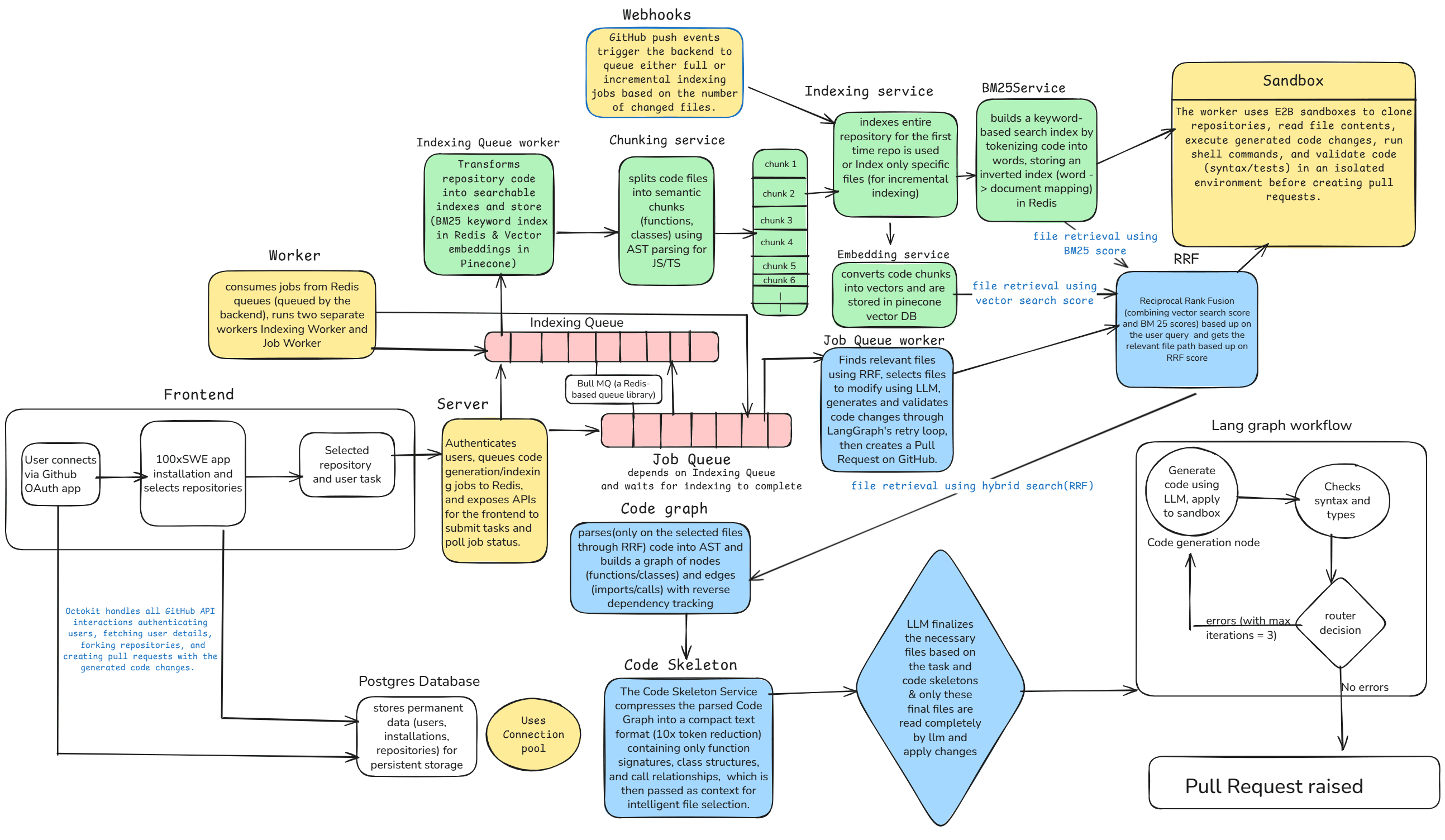
High-level system architecture — from GitHub issue to pull request
Project Overview
This system automates the entire pull request workflow by combining TypeScript AST parsing, hybrid search algorithms, and LangGraph orchestration to generate, validate, and test code changes with minimal manual intervention.
The architecture leverages vector embeddings, BM25 keyword indexing, and reciprocal rank fusion to intelligently retrieve relevant code files, while E2B sandboxes provide isolated testing environments with automated rollback capabilities.
System Architecture
Frontend
Next.js + TypeScript interface for monitoring PR generation, viewing logs, and managing GitHub integrations
Backend
Node.js + Express API handling webhooks, authentication, and orchestrating the entire PR workflow
Worker
Redis-based queue processor executing long-running code generation and validation tasks asynchronously
Core Features
1. TypeScript AST Parsing
Parses TypeScript source code into Abstract Syntax Trees to understand code structure, dependencies, and relationships between functions, classes, and modules.
Tech Stack:
Use Cases:
- ▪Extract function signatures and dependencies
- ▪Identify import/export relationships
- ▪Generate code skeletons for token efficiency
- ▪Map cross-file references and call graphs
2. Hybrid Search & Retrieval
Combines BM25 keyword-based search with vector embeddings to retrieve the most relevant code files for any given task or issue.
Tech Stack:
Use Cases:
- ▪Find relevant files when user describes a feature
- ▪Retrieve semantically similar code patterns
- ▪Balance keyword matching with semantic understanding
- ▪Reduce context window by selecting only relevant files
3. LangGraph Orchestration
Uses LangGraph to orchestrate multi-step validation workflows with parallel consistency checks, retry logic, and state management.
Tech Stack:
Use Cases:
- ▪Validate code changes across multiple files simultaneously
- ▪Check for breaking changes and type errors
- ▪Coordinate between code generation and testing phases
- ▪Implement retry strategies with exponential backoff
4. E2B Sandbox Testing
Executes generated code in isolated E2B sandbox environments to run tests, validate functionality, and ensure no regressions before creating PRs.
Tech Stack:
Use Cases:
- ▪Run unit and integration tests in isolation
- ▪Validate code changes don't break existing functionality
- ▪Automatically rollback failed changes
- ▪Capture test outputs and error logs for debugging
5. GitHub Integration
Deep integration with GitHub API for webhooks, OAuth authentication, repository cloning, and automated PR creation with detailed descriptions.
Tech Stack:
Use Cases:
- ▪Listen to push events and issue comments
- ▪Authenticate users and clone private repositories
- ▪Create PRs with AI-generated code and descriptions
- ▪Update PR status based on validation results
End-to-End Workflow
Trigger Event
User creates an issue or comments on a PR describing the desired code change
Webhook Reception
GitHub webhook fires to backend, validated via signature verification and queued in Redis
Code Indexing
Worker clones repository, parses all TypeScript files into ASTs, generates embeddings and BM25 index
Intelligent Retrieval
Hybrid search uses reciprocal rank fusion to find top-k most relevant files based on user request
Code Generation
LLM receives code skeletons (compressed ASTs) + context to generate proposed changes with minimal tokens
LangGraph Validation
Parallel validation checks: type consistency, breaking changes, cross-file dependencies
Sandbox Testing
E2B sandbox executes tests on generated code; rollback if tests fail
PR Creation
If all validations pass, create GitHub PR with AI-generated description and link to issue
Technology Stack
Backend
- Node.js + Express
- TypeScript
- Prisma ORM
- PostgreSQL
- Redis + BullMQ
- JWT Authentication
AI & ML
- LangGraph
- LangChain
- OpenAI / Gemini API
- Vector Embeddings
- BM25 Search
- Reciprocal Rank Fusion
Frontend
- Next.js 14+
- React
- TypeScript
- Tailwind CSS
- Lucide Icons
DevOps & Testing
- E2B Sandbox
- Docker
- DigitalOcean
- Vercel
- GitHub Actions
- Daytona
Design Philosophy & Technical Deep Dive
How we built an AI agent that understands your codebase and raises PRs — from research to production.
The Problem
How other agents work
- ✗Search codebase with grep — pure keyword matching
- ✗Dump flat, unranked file list to LLM
- ✗LLM burns tokens reading irrelevant files
- ✗No awareness of cross-file dependencies
How 100xSWE works
- ✓Hybrid search: semantic embeddings + BM25 keyword matching
- ✓RRF-fused ranked results — most relevant files first
- ✓Code skeletons compress context by 70-80%
- ✓AST-based dependency graph tracks cross-file impact
The retrieval system combines two complementary search strategies and fuses their results for optimal relevance.
Vector Search
Code is parsed into AST-aware chunks (functions, classes, imports) using Babel, then embedded as vectors and stored in Pinecone. Matches by meaning, not just keywords.
BM25 Search
An inverted index built from every word in the codebase. Computes relevance using term frequency, document frequency, and chunk length. Excels at exact matches.
RRF Fusion
Reciprocal Rank Fusion merges both ranked lists using position-based scoring:
score = 1 / (60 + rank)Semantic search gave agents 12.5% higher accuracy on codebase questions compared to grep alone. On 1,000+ file codebases, code retention increased by 2.6%.
Cursor Engineering BlogBM25 combined with a lightweight model achieved 22% on SWE-Bench Lite using only two model calls per instance, using coarse-to-fine file retrieval.
SWE-Fixer — arXiv:2501.05040Reciprocal Rank Fusion rewards documents appearing high in multiple result sets while giving partial credit to those excelling in just one — a parameter-free way to merge rankings.
TigerData Engineering BlogRoadmap
Grep Fallback
PlannedFall back to keyword search when hybrid search doesn't surface the right files — used as a last resort after smarter methods.
Planning Agent
PlannedAgent presents a plan before writing code. Developers review, leave feedback, and iterate before any PR is created.
Test Validation
PlannedRun existing test suites against generated code and feed failures back into the fix loop for higher reliability.
Research & References
Key Optimizations
Token Efficiency
- Code skeleton compression reduces context by 70-80%
- Only sends function signatures and type definitions to LLM
- Hybrid search limits files to top-k most relevant
- Incremental indexing only processes changed files
Performance
- Redis queue prevents webhook timeouts
- Parallel validation with LangGraph workers
- Prisma connection pooling for database efficiency
- Vector index caching for fast retrieval
Reliability
- E2B sandbox isolation prevents code injection
- Automated rollback on test failures
- Exponential backoff retry logic
- Webhook signature verification prevents spoofing
Scalability
- Stateless backend enables horizontal scaling
- Worker processes can scale independently
- Database indexes on frequently queried fields
- CDN deployment for frontend (Vercel)
User Journey Example
Install GitHub App
User installs the GitHub App on their repository, granting access to read code and create PRs
Create Issue
User creates an issue: "Add input validation to user registration endpoint"
Automatic Processing
System indexes the repository (if not already done), identifies relevant files using hybrid search, and generates validation code
Validation & Testing
LangGraph validates the generated code for type safety and cross-file consistency, then E2B sandbox runs all tests
PR Creation
System creates a PR with the validation code, detailed description, and links back to the original issue
Review & Merge
User reviews the AI-generated code, requests changes if needed, and merges when satisfied
Future Enhancements
Multi-language Support
Extend AST parsing to Python, Java, Go, and Rust codebases
Conversational Refinement
Allow users to iterate on generated code through chat interface
Cost Optimization
Implement caching layer for repeated queries and code patterns
Analytics Dashboard
Track PR success rates, token usage, and code generation metrics
Custom Validation Rules
Let users define project-specific linting and validation rules
Multi-agent Collaboration
Deploy specialized agents for testing, documentation, and refactoring